By Ray Nicolini
With Epic 4G styling, a front-facing camera and a $150 post-rebate price, it's easy to mistake the Samsung Transform for a high-end phone. Don't. The reality is that it's a evolution of Samsung's mid-range Moment and Intercept more than anything else -- you're paying an additional $50 here to get a front-facing camera, an LED flash and a few welcome tweaks, but the same ho-hum performance plus a few new annoyances to boot. Where does it improve and where does it fail? Find out in our full review.
Pic via Engadget.com
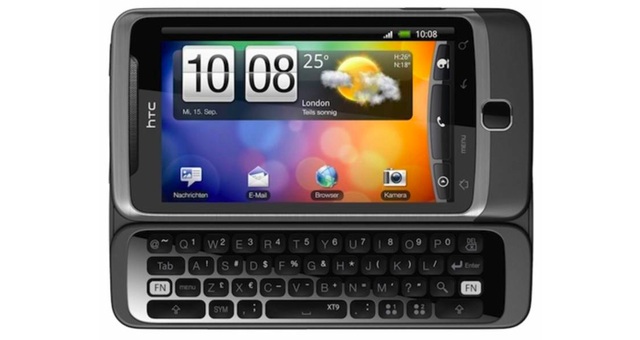
There's really no faulting the Transform's design, assuming you're a fan of the Epic 4G -- it's a handsome phone done up in glossy black with a tastefully thin chrome band running down the center of the device. The Transform's just a little bit thicker and more squared off than its Galaxy S inspiration, and while it feels a good bit cheaper and more plasticky than some high-end Android devices, it's actually got a very solid build. The chassis has little creak, the spring-loaded sliding hinge is strong, the hardware buttons are lightly textured and easy to find and press one-handed, and the QWERTY keyboard may actually be the best we've seen on a mid-range Android device. Oh, and it's got a little sliding door for the micro-USB port -- always a nice touch.
 Though the keys themselves are a little bit shallow and don't make a satisfying click, the layout here is very good, with the whole alphabet accessible in the familiar desktop arrangement rather than haphazardly rearranged around the space bar and function keys as it was with the Moment and Intercept keyboards. (Tween text fiends will be happy to hear the dedicated emoticon key returns.) In case it gives you any indication of how easy it is to learn and use, we just typed the last two paragraphs of this review on the Transform itself. If only the capacitive digitizer was as easy to like -- it's not bad, but a little bit laggy and occasionally missed our inputs.
The rest of the Transform's components are decent for a mid-range device, though we wouldn't call any of them good -- like the 3.5-inch, 320 x 480 LCD screen, which is fairly bright and clear enough, but also a bit washed out. The 3.2 megapixel auto-focus imager in back took reasonably good shots outdoors, even as indoor snaps showed considerable noise, and the VGA webcam up front added a yellow tint to all the self-portraits we tried. Last but not least, if noise cancellation is present, it doesn't work very well -- though call quality was fine on our end, call recipients told us they could hear plenty of background noise while we spoke.
 The Samsung Transform runs on Android 2.1 -- though Sprint promised us it would see Froyo later this year -- with a novel carrier feature called Sprint ID on top. Rather than covering the entire phone in a custom UI like Sense, TouchWiz or what have you, Sprint ID installs a custom button on the home screen (you can see it immediately above) which lets you swap between sponsored packs of applications, settings, wallpapers and widgets. While this was pitched to us as a reasonably compelling idea that would help newcomers to find some of the best Android has to offer, and let power users like us switch between multiple profiles on the go, that's not how it worked out in our tests. First off, the more Sprint ID packs we installed, the slower our phone got, because the system doesn't actually shut down apps from profiles not in use -- it just hides them from view while they continue to run in the background. Second, Sprint ID doesn't necessarily install and set up everything it suggests to the user, as certain packs will just dump a bunch of shortcuts on the screen, which lead you right back to the Android Market to install the app for yourself. Also, and this may be obvious, but don't expect companies to sponsor packages that give you paid apps for free -- the Games by EA pack, for instance, includes demo versions of Tetris and Scrabble, but it's primarily designed to advertise product for you to purchase later on.
Carving down Sprint ID to its least intrusive state and nuking the remaining background apps, we found the Transform's Android experience to be decently speedy, though the data connection was relatively slow even over Sprint's typically excellent EV-DO Rev. A network; graphically intense web pages like Engadget took a fair bit of time to load. Battery life might also be a concern, as our device didn't last a full day on a charge with normal use. There's some sort of bug with the phone's landscape mode at present, as the home screen won't switch orientation even when the keyboard is slid out, and we had a few complete system freezes when typing text messages and email in that mode. (Sprint says fixes are on the way.) We also noticed that 3D apps chugged tremendously, and certain games (including Angry Birds) wouldn't run at all. We ran a few tests but soon got confirmation from Sprint itself: the Transform's S3C6410 processor doesn't support hardware acceleration for OpenGL.
Perhaps most confusingly, the front-facing camera totally failed to respond to any of the video chat applications we tried -- Qik, Fring and Tango all failed, and one of the three actually stated that required hardware wasn't present on the phone. Tango's a bit of a newcomer, sure, but Qik and Fring are de facto video chat applications of choice on Android, and we were shocked to see neither working on a front-facing camera device.
 The Samsung Transform has the potential to be a solid Android device at $50 or perhaps even $100 if the issues get ironed out, but we can't imagine paying the $150 Sprint's presently asking for a buggy, hamstrung HVGA smartphone. As it stands the phone has the price, bullet points and styling to deceive customers into thinking they're getting something akin to an cheaper Galaxy S experience -- even if that isn't Sprint's intent -- but in its current state it's much, much farther than $50 behind the current crop of $200 smartphones, and we honestly believe you'd be better off saving those pennies rather than buying something you might regret.
via Engadget.com


Hardware
There's really no faulting the Transform's design, assuming you're a fan of the Epic 4G -- it's a handsome phone done up in glossy black with a tastefully thin chrome band running down the center of the device. The Transform's just a little bit thicker and more squared off than its Galaxy S inspiration, and while it feels a good bit cheaper and more plasticky than some high-end Android devices, it's actually got a very solid build. The chassis has little creak, the spring-loaded sliding hinge is strong, the hardware buttons are lightly textured and easy to find and press one-handed, and the QWERTY keyboard may actually be the best we've seen on a mid-range Android device. Oh, and it's got a little sliding door for the micro-USB port -- always a nice touch.
The rest of the Transform's components are decent for a mid-range device, though we wouldn't call any of them good -- like the 3.5-inch, 320 x 480 LCD screen, which is fairly bright and clear enough, but also a bit washed out. The 3.2 megapixel auto-focus imager in back took reasonably good shots outdoors, even as indoor snaps showed considerable noise, and the VGA webcam up front added a yellow tint to all the self-portraits we tried. Last but not least, if noise cancellation is present, it doesn't work very well -- though call quality was fine on our end, call recipients told us they could hear plenty of background noise while we spoke.
Software and performance
Carving down Sprint ID to its least intrusive state and nuking the remaining background apps, we found the Transform's Android experience to be decently speedy, though the data connection was relatively slow even over Sprint's typically excellent EV-DO Rev. A network; graphically intense web pages like Engadget took a fair bit of time to load. Battery life might also be a concern, as our device didn't last a full day on a charge with normal use. There's some sort of bug with the phone's landscape mode at present, as the home screen won't switch orientation even when the keyboard is slid out, and we had a few complete system freezes when typing text messages and email in that mode. (Sprint says fixes are on the way.) We also noticed that 3D apps chugged tremendously, and certain games (including Angry Birds) wouldn't run at all. We ran a few tests but soon got confirmation from Sprint itself: the Transform's S3C6410 processor doesn't support hardware acceleration for OpenGL.
Perhaps most confusingly, the front-facing camera totally failed to respond to any of the video chat applications we tried -- Qik, Fring and Tango all failed, and one of the three actually stated that required hardware wasn't present on the phone. Tango's a bit of a newcomer, sure, but Qik and Fring are de facto video chat applications of choice on Android, and we were shocked to see neither working on a front-facing camera device.
Wrap-up
via Engadget.com