About Toronto Wireless

Tuesday, May 11, 2010

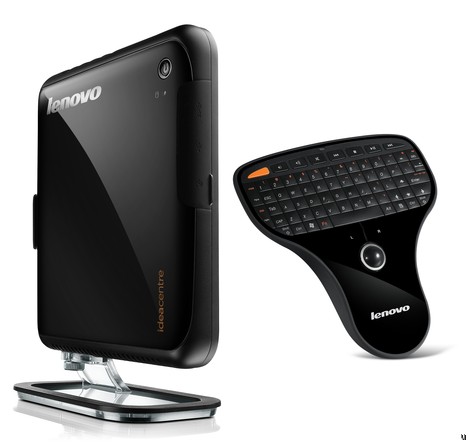
Lenovo IdeaCentre Q150 Targets your living room


Lenovo IdeaCentre Q150 targets living room enthusiasts

Lenovo seems to have a little something for everyone this time round, with the IdeaCentre Q150 being marketed towards those who want an affordable and yet effective living room entertainment system. It definitely ought to be able to squeeze into even the most crowded living rooms, measuring just 0.82" wide and 6.7" in height, capable of sitting or placed anywhere without being noticed or out of place. This pocket-friendly nettop PC can be hooked up to an external display, where it comes with an optional NVIDIA ION 512MB graphics processor that is capable of offering smooth Full HD (1080p) video via the onboard HDMI output, an optional multimedia remote with an integrated trackball mouse and mini keyboard, as well as letting you check emails, browse the web and watch Internet streaming video from the comfort of your favorite lounge chair. With prices starting from $249 as it arrives in the market at the end of next month, this looks to be a hot seller among the middle class demographic who are aiming to jump aboard the HTPC platform for the first time.

Monday, May 10, 2010

My Thoughts on the iPad A Month Later

My Thoughts on the iPad A Month Later

Review By: Jason Cipriani from www.berryscoop.com 

Right after getting the iPad I shared my first impressions with you guys.  They were mixed with excitement about a new product, yet confusion on how it would fit into my life.  After a month with heavy use on the iPad I can say that it has fit into my everyday blogging, browsing, occasional game playing life. Is it or can it replace a laptop?  Would I recommend it to a friend?  What would I change?  Read on to find out.
In my first impressions post I talked about having a hard time adjusting to the shape and figuring out how to hold it while typing.  That issue has been eliminated as I have adjusted to it, and in fact I can type almost as fast on it (without looking) as I can any wireless device I have used, including my BlackBerry.  One capability I really love is the fact that my Apple Bluetooth keyboard works on the iPad.  A few times now I have set the iPad in the dock and hooked up the keyboard to blog away.  In fact, I am doing it right now.  The best part about this isn’t that it is faster to type and enter information, it is the fact that the keyboard shortcuts for such things as copy and paste work!  There are some issues with the WordPress application with not always giving me the option to paste information I have copied from different apps on the iPad into the blog post.  This becomes a non factor with the keyboard as I can use the keyboard shortcut to paste the text into the post.  Even the shortcut for undo works, love it!
I have used the iPad primarily for blogging, email, and browsing the internet.  All of which is presented to the user in a fun interactive manner.  To be honest, it has become my device of choice to surf the internet on when I am around the house.  It’s small and light frame with a full interactive screen makes browsing the internet fun again.  Kind of like it was for the first year after you started browsing, you remember what I am talking about.  That is exactly how I feel when browsing the internet in the iPad.
The applications for the iPad have gotten me in nothing but trouble.  I have spent more on applications in the last month, strictly for the iPad, than I have total for every other device I own combined.  My favorite application by far is LogMeIn Ignition.  With this application I am able to log into both my work PC and my MackBook Pro at home anywhere I have a Wi-Fi connection.  This service has saved me a few times already.  There area  ton of other applications I have purchased but this isn’t the type of post to go through them one by one.  I love what developers have done so far, but feel there is so much more that they can do, and in time I am sure they will.
I have converted quite a few books over to ePub format and have enjoyed reading them on the iPad.  This is one of the biggest parts of the iPad that I want to use but need to free up my time to take advantage.
If I had to do it all over again I would get the iPad in a heartbeat.  I would also tell any family member, no matter the age (within reason) that they should purchase one as well.  My only regret is not getting a 3G iPad.  I haven’t had the need to use the iPad while out and about yet, but I have always said it is better to have something and not need it than to not have it and need it.  For the first time around Apple nailed it, with iPhone/iPad OS 4.0 on the horizon (this fall for the iPad) which will enable multitasking I can honestly see myself leaving the MBP at home while I take just the iPad on business trips.  The greatest thing about all of this is the fact that Apple can only improve it from here.

Sunday, May 9, 2010

iWatch Projector Watch concept put iPhone on your wrist


iWatch Concept projector watch Concept: ADR Studio
From the iPhone 4G concept designers ADR Studio, the latest creation is the iWatch. The concept’s slogan is “It’s time to change the time.” And indeed it would. A little on the bulky side the 16GB device not only tells time, but according to its creator it also has Wi-Fi and Bluetooth connectivity, allowing you to sync with an iPhone or iPad. A weather forecast system, integrated RSS reader for keeping tabs on the news, an LCD projector to display photos and of course multiple strap colors to choose from.

Saturday, May 8, 2010

Free BB App: Add Current Location to Text Messages with Wizi SMS Location


There’s a lot of BlackBerry users out there freaked out by the whole “send my location” function on BBM.  Then there’s the rest who find it useful when trying to find out exactly where friends, family, and coworkers are at the moment.  With Wizi SMS Location, you can have your location sent out within a text message.  The app is super light on your BlackBerry, so don’t worry about space or leaks. Integrated with the Contacts Book and SMS application, it basically just adds a tiny URL to the SMS messagelinking to the location map, that can be opened on any phone with web access. So now you’re not limited to send it to your BlackBerry buddies only but also your iPhone, Android, and other web enabled devices.  Location address and GPS coordinates may be automatically added to the sent message also.
Features:
  • Adds a new option to Contacts Book
  • Finds user on map using GPS and Cell ID
  • Adds a tiny url to the message linking to a map of the location
  • Allows switching between Map View and Satellite View
  • Search locations by address
  • Allows automatic insertion of address in text message
  • Allows automatic insertion of GPS coordinates in text message
Wizi SMS Location is free to download from the PocketBerry Store.  Use the link below to download today over the air.

iPad Case with Keyboard

BlackBerry Bold 9800 slider caught on video

Hertz RentACar Launches rental car booking app


Hertz has launched a rental car booking app for BlackBerry. The app can use GPS to find the closest Hertz location, shop from their lot’s availability and save favorite locations.
The developers say that the next version will feature Storm support, the ability to edit your current reservation(s), multi-language support, WiFi and cell tower positioning to get positioning data even indoors.
I’m surprised at how many apps omit Storm support from their flagship launch. You would figure developing an accompanying iPhone app would allow you to use the iphone art assets for your Storm port.
I am however, glad to see developers getting curious about the more robust assisted GPS data that RIM is implementing. Imagine how much better all the GPS driven apps will with accurate indoor GPS data.

OS 6 Theme With Sliding Dock, Customizable Icons and Today Feature


After getting a preview of OS 6 at WES, BlackBerry users everywhere are hoping that their device will get the upgrade. The reality is that many of the older devices won’t be getting the update, and it’s possible that even newer devices such as the Storm2 won’t be OS 6 compatible. Thankfully theme designers such as WJD Designs can at least give users the look of 6 with these such as this.
This BlackBerry 6 theme features:
  • Today Feature (only on the Storm)
  • 24 Customizable Icons on Storm Devices (change application Icon order)
  • 18 Customizable Icons on Other (change application Icon order)
  • 3 Screen Slide Docks
  • Hidden Dock Feature for Full Screen wallpaper
  • Just over 1 MB in size
  • Minimal Lag and Multi Function
  • Custom Icons to mimic new OS 6 Icons

Android running on the iPhone 3G!

WiFi Digital Camera Addon - Eye Fi


8GB Eye-Fi cardWIRELESS TRANSFER of photos in an otherwise non-wifi enabled digital camera. How? Eye-Fi. Yes, I would like one of these.
Try as I might, I usually end up walking away from the house or the office without the cable to connect my camera to the laptop. When it comes to transferring photos on the move, that can be a right pain in the neck. Sure enough, you can pick up digital cameras of all shapes and sizes (that might cost you a bit more on the credit card) packing WiFi transfers, GPS, location tagging and the likes. But for those of us looking for a WiFi option, the Eye-Fi might be just the ticket.
According to TUAW, you can set the card “to automatically upload to iPhoto, or just to a specific folder on your computer. You also have the option to have your pictures uploaded to MobileMe, Flickr, Evernote, Picasa, Facebook, and many other places (see chart in new window). Videos can be uploaded to Flickr (only 90 seconds maximum, though), Picasa, YouTube, Facebook, Phanfare, and Photobucket. You can even set it up to send notifications via email, Facebook, Twitter, or SMS when transfers start, finish, or are interrupted.”
It’s a Class 6 wireless SD card meaning it should shift around 6mb a second and Amazon have the new 8GB model on pre-order for the princely sum of $149.99.
It might seem a bit on the steep side for an SD card. Argos are happy to flog them for anything up to €60 for an 8gb SDHC card, and if the Euro conversion rate at €112 or so held up, an extra €50 isn’t a bad price to pay to get full WiFi capabilities for your digital camera.
Note: Did I actually say “just the ticket”?

Friday, May 7, 2010

My First Android: Observation's from An Ex-Blackberry User

My First Android: Observation’s from An Ex-BlackBerry User
Posted on 07. May, 2010 by John in BerryScoop 
Our Friend Kai Armstrong sent us this article for a guest submission and it was too good to pass by. His thoughts on the Android vs. BlackBerry situation are spot on in my opinion, and I could not agree with him more. Be looking for my official review on the HTC Incredible as a business device and Jason’s review from all other perspectives in the next few weeks.
So I’ve had my HTC Droid Incredible for all of a couple days now and decided that made me completely qualified to write up a few thoughts on the subject. I won’t give you a review on the phone or specs and features…they’ve been beaten to death all over the internet so go and find them.
First Impressions
The Android Platform is leaps and bounds beyond the BlackBerry OS (my mobile OS prior to snatching up this phone). I’ve never used (for any length of time) the stock builds of Android from Google and this phone runs the HTC Sense skinned version which is AMAZING. The interface is fluid and enjoyable…really sucks me in. It’s really nice to be able to move whatever you want, have multiple places to put stuff and Widgets…the greatest thing about Android. One of the quirky little things that I’m enjoying is that after unlocking the phone the HTC weather widget plays an animation of the weather (yesterday we had storms so it showed clouds, rain and lightning) nothing necessary at all, but a nice little feature.
I’m sure part of it is still new gadget syndrome, but I haven’t been on my laptop as much the past few nights, just using my phone for things.
The email experience that I’m getting on Android is AMAZING, they say BlackBerry is king of email, and for some it might be, but for me Android is doing amazing things. I’ve got my gmail account (my primary personal email) and that takes over the phone, so when your life is already in Google, you sign in and things work great…contacts, calendar, etc..all there! Then I added my work exchange email account, and the experience here is amazing. Instant email, calendar sync, and an option for the contacts as well…it all just works.
Applications
So one of the things everyone wants to talk about is App this or app that…well I’ve been REALLY happy with what’s available for Android. I think on every platform you can find the apps you NEED, but what really makes Android great in comparison to BlackBerry, is there are all these extra apps, that I don’t need, but they’re certainly fun. I’ll list out what I’ve got on it now:
  • Mint.com – Just nice if you have a Mint account to keep track
  • Bank of America – more financial stuff on the go
  • Pandora for Streaming Music, with a great widget on one of the screens
  • Dropbox – AMAZING if you have a dropbox account, instant access to all that stuff and an easy way to get stuff back to the PC
  • Transdroid – monitors torrents downloading at home
  • Remote Desktop Client – Connect and control a Windows PC via Remote Desktop
  • ConnectBot – SSH client for some servers at work
  • Google Sky Map – ONE OF MY FAVORITES just turn it on and it shows you what stars and stuff are above you when you move the phone, really cool
  • Google Voice – I’ve got totally integrated Google Voice on the phone for VoiceMail, Texts and Calls
  • Twitter for Android – official Twitter client, also using Twicca for picture support
  • Facebook for Android – a big letdown compared to most other Facebook apps, but the touch.facebook.com interface is pretty nice
  • Foursquare for checking in places
  • 360 Live for checking up on Xbox Live stuff
  • Games…no shortage of different ones to play with here…sadly no Words with Friends…
I’m sure I’ll find tons more stuff to play with and tryout, but those were the ones I quickly snatched up and i’m loving them. The experiences are great and everything runs well. It’s great to hop back and forth between apps, and everything integrates really well. Easily send information from one app to another.
What I Love…
The Notification System…pulling down that little bar at the top and a big long list of notifications is great. It’s easy to see what needs your attention. You can click on one and jump from whatever your doing straight to that notification, or you can just slide the dock back up and leave them for later. It’s a really unobtrusive way to find out whats happening. As far as the LED…its a bit useless on this phone…but that’s OK.
The Interface…it is amazing to just move back and forth and in or out of applications and menus with ease. The interface is well thought out and can easily be navigated. All the little transition features, or slides back and forth and the weather thing…just icing on the cake of a very pleasant experience.
The web browser. One of my biggest gripes about BlackBerry was the fact that I was SCARED to click on links from people…the browser was so slow, probably wouldn’t have rendered it right or crashed. It’s nice to be cruising twitter, see a link and go to whatever it is
What I Miss…
So there are certainly a few drawbacks to changing platforms, especially after you’ve gotten one figured out pretty well. One of the big ones is BlackBerry Messenger, it was how I kept up with a few people, but certainly how the wife and I kept in touch throughout the day. In fact, she just called and asked why I hadn’t responded to one…she’s still adjusting too I guess. I think Google Talk can certainly take the place of BlackBerry Messenger for me, and is a much more flexible solution for cross platform communication.
That little LED on my BlackBerry…those of you that have had one know what I’m talking about. It was great, I had it all setup with different colors and it would just blink and let you know what type of message you had and what you needed. It was really handy.
SocialScope, by far my favorite app on BlackBerry was SocialScope. SocialScope is a multi-social-network application. It was one app that could do Twitter, Facebook, Foursquare and Flickr. VERY VERY nice and smooth and was really great to keep up with everything from one window.
Other Thoughts
The Facebook app is the worst…it doesn’t get notifications for very many things, and its a bit clunky to navigate. I’m happy that I get the emails, click on the link and head into the browser, but a more complete application with integration and notifications would be great.
I’m not sure why I have an optical track-pad at the bottom of the phone, the only thing I can figure out for it so far is that it’s the only camera button…
The camera is good, my few tests with it seem to make me think that it works best outdoors with lots of natural light. My experience in low-light or indoors has been a blue tint…which I’ve seen replicated around the internet…maybe it needs a touch of tweaking.
The community is great, people quickly help you out, find apps, let you know whats out there. Really great, and I’ve managed to keep a lot of my BlackBerry friends as we all seemed to migrate to this phone at the same time…
Swype is an interesting concept. It’s a keyboard where you just run your fingers across it and the words magically appear…I’m getting used to it, but can certainly see it being my default.
Conclusion
Android certainly isn’t for everyone…in fact I think it appeals to a deeper geeky side than other platforms might. It is so flexible in allowing you to move things or install apps from anywhere, move them around in the file-system, or whatever else you please that it’s certainly not a phone for everyone. In fact, I think the menu system and settings scattered all over the place might be daunting to some people, but to me its that fine level of control that I enjoy and like. I’m not certain that I’ll be an Android user forever, but I think the platform is really on the right track and I’m loving every minute of it.
Sony DSC-TX5 Hands-On Review

Rogers Apple iPad Update


iPad RogersYou may have seen today’s news that the iPad is coming to Canada on May 28.
With pre-orders set to start Monday, we know there’s anticipation for more details. There’s nothing to share just yet, but we’ve set up a page(http://www.rogers.com/iPad) where you can stay in the loop.
Later today, the page will allow you to sign up and get the latest information delivered straight to your inbox.
And as always, we’ll keep you posted right here on RedBoard. Stay tuned!
Richard Bloom is a regular contributor to RedBoard.

Archos 7 Android Home Tablet for $199


Portable-multimedia-gadget maker Archos on Thursday announced the Archos 7 Home Tablet: It's "the first large-screen Android-based tablet," according to the company, offering "always-on access to the Web, e-mail, photo, video and a dedicated library of Android Apps enabling users to customise the device to their lifestyle."

The very portable Archos 7 features a 7-inch high-res touchscreen (800 by 480), weighs a mere .8 pounds, and is just .47 of a inch thick. It comes with 8GB of Flash memory and has built-in Wi-Fi connectivity; it also can connect to your PC or other devices via USB.

The Archos 7 is rated for 7 hours of video or 44 hours of audio playback. Selected apps are preinstalled, including the book-reading app Aldiko, eBuddy for IM, and DailyPaper.  Other apps developed expressly for the device will be available to download. The table will play MP3 files and you'll also have access to Deezer, a the free music-streaming service.

If you're comparing this tablet in your mind to that tablet from Apple, here's one big differentiator: The price will be $199.99 list. You can pre-order at Amazon and get your Archos 7 early, in mid-May; it will hit other retailers in June.

Thursday, May 6, 2010

Rogers Rolling-Out "My Account" App for BlackBerry


Rogers My Account for BlackBerry
Rogers (NYSE: RCI) really seems to be putting the hammer down on customer servicethese days. Not so long ago they launched their RedBoard Blog to allow them to reach out and more directly communicate with their customers. Now, just yesterday they announced (via the RedBoard) that a new ‘My Account’ app for BlackBerry (NSDQ: RIMM) will be available shortly for OTA download. The new app will join their already existing Android, iPhone and mobile browser applications that have been available for some time.
Within the Rogers My Account app for BlackBerry you’ll find complete and easy access to help manage your Rogers account, no matter where you are… and of course at any time of day. The data found inside will be current up to 4 hours, and will reset automatically on your bill date.
Over the next little while the app will be rolled-out to Rogers 8220, 8520, 8900, 9000 and 9700 customers. Look for a ‘My Account’ icon to show up on your desktop. If you already have it, click it to install. If you don’t have it yet, you can continue to use the mobile browser app, or, do a battery pull and reboot your Berry.
For all the details, head on over to Rogers RedBoard.